GestureBot Racer. The Morning Set

Holiday camp8+ yearsat 9:00VAT inc
5
parent rating
500+ students
building & coding
GestureBot Racer. The Morning Set — hands-on robotics class
Holiday camp8+ yearsat 9:00VAT inc
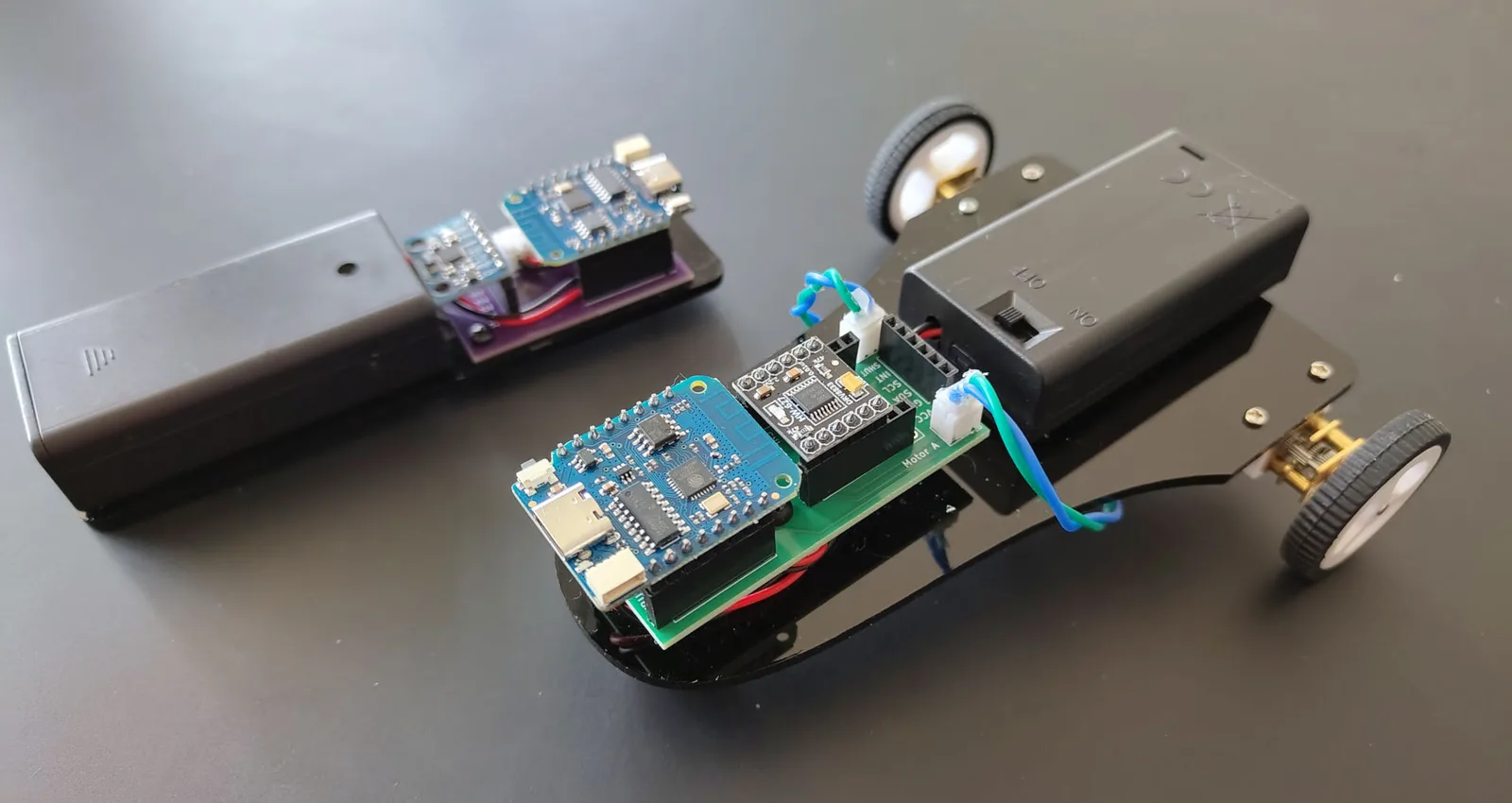
GestureBot Racer is a gesture-controlled robotic car designed for young robotics learners. In this project, children build and control a small robot car using a special motion controller that can be held in the hand or attached to a glove.
8+ yearsat 9:00VAT inc

Description

GestureBot Racer is a gesture-controlled robotic car designed for young robotics learners. In this project, children build and control a small robot car using a special motion controller that can be held in the hand or attached to a glove.

The robot is made from two main parts: the car itself and the wireless controller. The car uses an ESP8266 microcontroller and a DRV8833 motor driver to control two DC motors. The controller also uses an ESP8266, together with a GY-521 motion sensor, to detect how the hand is tilted.

When the controller is tilted forward, the car moves forward. When it is tilted backward, the car moves backward. Tilting the controller left or right makes the car turn. When the controller is held in the middle position, the car stops. This makes the project easy to understand because children can directly see how their hand movements affect the robot.

Students in this age group use block-based programming to create the control logic. They learn how to send commands such as forward, backward, left, right, and stop, and how these commands are used to control the motors. The project helps children understand the basic ideas of robotics, sensors, wireless communication, and motor control in a fun and practical way.

GestureBot Racer is a hands-on project where children can build, test, improve, and play with their own gesture-controlled robot.

That is take home project!

Requirements

  1. You must be confident in using a computer, keyboard and mouse. At the good user level.
  2. Know how we save files on a computer, what a file and folders are, etc.
  3. Be able to switch between windows in the operating system. Use the keys’ shortcuts.
  4. No previous experience with 3D modeling is required
  5. No previous experience Robotics is required.

Learning outcomes

Understand the main parts of a robot

Pupils learn that the robot has a controller, motors, a motor driver, a battery/power source, and a wireless control system.


Build a simple robotic car system

Pupils connect the main electronic parts and see how the microcontroller, motor driver, and motors work together.

Explore gesture-based control

Pupils learn how tilting a hand controller can make the robot move forward, backward, left, and right.

Use block programming to control movement

Pupils create simple logic blocks for commands such as forward, backward, turn left, turn right, and stop.

Understand basic wireless communication

Pupils discover that one device can send movement commands wirelessly to another device.

Test and improve robot behaviour

Pupils experiment with movement, turning, stopping, and control sensitivity, then adjust their program to make the robot easier to drive.

Term dates

Age: from 8 years old (to 11)

Schedule

9:00Weekdays
8+ years5 days

All equipment, laptops, robots and educational materials are provided by us.

Convenient location in Richmond

📍Parkshot, Richmond TW9 2RE
The closest parking at the Old Deer Park (Extension)
Request info

Trusted by parents in London

5.0
out of 5 · 42 Google reviews
Book a Trial

Reserve Your Child’s Trial Lesson

Join a hands-on robotics lesson in Richmond. All equipment included. Small expert-led groups.
Child's age
WhatsApp us for questions