GestureBot Racer. Advanced classes

Holiday camp11+ yearsat 12:30VAT inc
5
parent rating
500+ students
building & coding
GestureBot Racer. Advanced classes — hands-on robotics class
Holiday camp11+ yearsat 12:30VAT inc
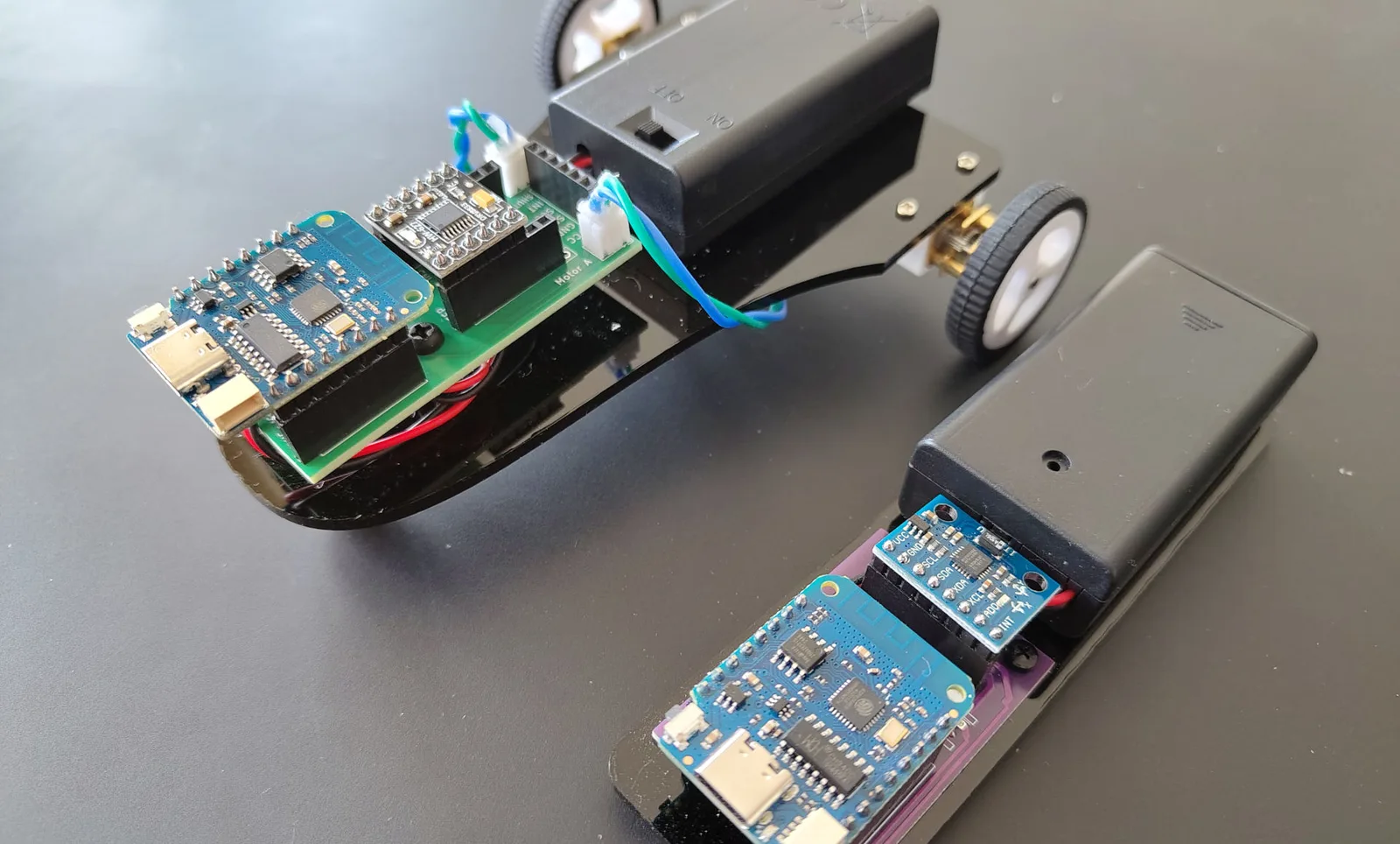
The system consists of two separate devices: a robotic car and a wireless motion controller. The car uses an ESP8266 board to receive commands and control two DC motors through the DRV8833 motor driver using PWM signals. The second ESP8266 board works as the controller and is connected to a GY-521 module, which contains an MPU-6050 accelerometer and gyroscope. This sensor detects the tilt of the controller and converts hand movement into driving commands.
11+ yearsat 12:30VAT inc

Description

The system consists of two separate devices: a robotic car and a wireless motion controller. The car uses an ESP8266 board to receive commands and control two DC motors through the DRV8833 motor driver using PWM signals. The second ESP8266 board works as the controller and is connected to a GY-521 module, which contains an MPU-6050 accelerometer and gyroscope. This sensor detects the tilt of the controller and converts hand movement into driving commands.

The controller reads the motion sensor data, calculates the direction of tilt, and sends commands to the car using ESP-NOW. If the controller is tilted forward, the car moves forward. If it is tilted backward, the car reverses. Tilting left or right makes the car turn, while the central position creates a dead zone where the car stops safely. This makes the robot responsive while avoiding unwanted movement from small hand vibrations.

Students in this age group work with Arduino C code and explore the full technical structure of the project. They learn how to read data from the MPU-6050 sensor over I2C, process accelerometer values, define movement thresholds, send wireless data using ESP-NOW, and control DC motors using PWM through the DRV8833 driver.

This project gives students practical experience with embedded systems, wireless communication, sensor-based control, and real-time robotics. It also introduces an important engineering idea: separating a robot into a control device and a moving device, with communication between them.

GestureBot Racer is a strong project for students who are ready to move beyond simple robot movement and start working with interactive control systems, sensor data, and wireless robotics.

Requirements

  1. You must be confident in using a computer, keyboard and mouse. At the good user level.
  2. Know how we save files on a computer, what a file and folders are, etc.
  3. Be able to switch between windows in the operating system. Use the keys’ shortcuts.
  4. No previous experience with 3D modeling is required.
  5. No previous experience in Robotics is required.
  6. You want to program robots and are not afraid to struggle with the difficulties of learning them.
  7. Minimum previous experience with text-based programming is required. Ideally, you are able to make a program that performs basic maths operations with numbers. The programming language itself is not important.

Learning outcomes

Understand the structure of a wireless robotic system

Students learn how the project is divided into two devices: a motion controller and a robotic car communicating wirelessly.


Read motion sensor data from the GY-521 / MPU-6050

Students learn how to use I2C communication to read accelerometer data and detect the tilt of the controller.

Use ESP-NOW for wireless communication

Students learn how ESP8266 boards can send and receive data directly without using a Wi-Fi router.

Control DC motors with a DRV8833 motor driver

Students learn how PWM signals control motor speed and direction through an H-bridge motor driver.

Create movement logic using Arduino C

Students write code to convert sensor values into robot commands such as forward, backward, left, right, and stop.

Improve stability using thresholds and a dead zone

Students learn why robots need filtering, movement thresholds, and a neutral stop zone to avoid unwanted movement and jitter.

Term dates

Start at 12.30 until 15.30

Age: from 11 years old (to 17)

Schedule

12:30Weekdays
11+ years5 days

All equipment, laptops, robots and educational materials are provided by us.

Convenient location in Richmond

📍Parkshot, Richmond TW9 2RE
The closest parking at the Old Deer Park (Extension)
Request info

Trusted by parents in London

5.0
out of 5 · 42 Google reviews
Book a Trial

Reserve Your Child’s Trial Lesson

Join a hands-on robotics lesson in Richmond. All equipment included. Small expert-led groups.
Child's age
WhatsApp us for questions